10 Phishing Email Templates for Security Awareness Training (Copy-Paste HTML, 2026)
Ten ready-to-use phishing email templates for security awareness training — Microsoft 365, Google, payroll, IT helpdesk, Slack, DocuSign, and more. Each includes complete HTML you can paste into your simulation tool and an explanation of the psychological trigger it uses.
The quality of your phishing template determines whether your simulation produces useful data. An obviously fake email that everyone spots tells you nothing — a realistic one that mirrors what employees see every day reveals your actual risk.
Below are ten complete phishing email templates you can use in your security awareness programme. Each includes the full HTML code (ready to paste into PhishSpark's template editor or any other simulation tool), the psychological trigger it uses, and the type of organisation it works best for.
All templates use PhishSpark's personalisation variables: {{FIRST_NAME}} (recipient's first name), {{PHISH_LINK}} (the unique tracked link per recipient), and {{TRACKING_PIXEL}} (invisible open tracker, paste at the bottom of the HTML body).
1. Microsoft 365 — Password Expiry Alert
Psychological trigger: Urgency + loss aversion (losing access to work tools)
Best for: Any organisation on Microsoft 365. Consistently produces high click rates because every M365 user has seen a real version of this email.
<!DOCTYPE html>
<html>
<head><meta charset="utf-8"></head>
<body style="margin:0;padding:0;background:#f3f2f1;font-family:'Segoe UI',Arial,sans-serif">
  <table width="100%" cellpadding="0" cellspacing="0">
    <tr><td align="center" style="padding:40px 16px">
      <table width="600" cellpadding="0" cellspacing="0" style="background:#ffffff;border-radius:4px">
        <tr><td style="background:#0078d4;padding:24px 40px">
          <span style="font-size:20px;font-weight:700;color:#ffffff">Microsoft</span>
        </td></tr>
        <tr><td style="padding:40px">
          <p style="margin:0 0 16px;font-size:15px;color:#323130">Hello {{FIRST_NAME}},</p>
          <p style="margin:0 0 16px;font-size:15px;color:#323130">Your Microsoft 365 password will <strong>expire in 24 hours</strong>. To avoid losing access to your email, Teams, and SharePoint, update your password now.</p>
          <a href="{{PHISH_LINK}}" style="display:inline-block;background:#0078d4;color:#ffffff;padding:12px 24px;text-decoration:none;border-radius:2px;font-size:14px;font-weight:600">Update password</a>
          <p style="margin:24px 0 0;font-size:12px;color:#605e5c">If you already updated your password, disregard this message. This link expires in 24 hours.</p>
          <hr style="border:none;border-top:1px solid #e1dfdd;margin:24px 0">
          <p style="margin:0;font-size:11px;color:#a19f9d">Microsoft Corporation · One Microsoft Way, Redmond, WA 98052</p>
        </td></tr>
      </table>
    </td></tr>
  </table>
  {{TRACKING_PIXEL}}
</body>
</html>
2. Google — Unusual Sign-In Detected
Psychological trigger: Authority (Google security team) + fear (account compromise)
Best for: Organisations on Google Workspace. Effective because Google genuinely sends these alerts — employees are conditioned to click them.
<!DOCTYPE html>
<html>
<head><meta charset="utf-8"></head>
<body style="margin:0;padding:0;background:#f8f9fa;font-family:Roboto,Arial,sans-serif">
  <table width="100%" cellpadding="0" cellspacing="0">
    <tr><td align="center" style="padding:40px 16px">
      <table width="540" cellpadding="0" cellspacing="0" style="background:#ffffff;border-radius:8px;border:1px solid #e0e0e0">
        <tr><td style="padding:24px 40px;border-bottom:1px solid #e0e0e0;text-align:center">
          <span style="font-size:22px;font-weight:700;color:#4285f4">Google</span>
        </td></tr>
        <tr><td style="padding:32px 40px">
          <p style="margin:0 0 8px;font-size:22px;font-weight:400;color:#202124">Security alert</p>
          <p style="margin:0 0 24px;font-size:14px;color:#5f6368">Hi {{FIRST_NAME}}, a new sign-in to your Google Account was detected from an unrecognised device.</p>
          <div style="background:#fef3c7;border:1px solid #f59e0b;border-radius:8px;padding:16px;margin-bottom:24px">
            <p style="margin:0;font-size:14px;color:#92400e">⚠ New device sign-in detected</p>
          </div>
          <p style="margin:0 0 24px;font-size:14px;color:#5f6368">If this was you, you can ignore this message. If you don't recognise this activity, your password may be compromised. Secure your account now.</p>
          <a href="{{PHISH_LINK}}" style="display:inline-block;background:#1a73e8;color:#ffffff;padding:10px 24px;text-decoration:none;border-radius:4px;font-size:14px;font-weight:500">Review activity</a>
        </td></tr>
        <tr><td style="padding:16px 40px 24px;border-top:1px solid #e0e0e0">
          <p style="margin:0;font-size:11px;color:#9aa0a6">© 2026 Google LLC, 1600 Amphitheatre Pkwy, Mountain View, CA 94043</p>
        </td></tr>
      </table>
    </td></tr>
  </table>
  {{TRACKING_PIXEL}}
</body>
</html>
3. Payroll — Bank Account Verification Required
Psychological trigger: Financial anxiety + urgency + personal stakes
Best for: Any organisation. The highest credential submission rate of any template category — employees act fast because their salary feels at stake.
<!DOCTYPE html>
<html>
<head><meta charset="utf-8"></head>
<body style="margin:0;padding:0;background:#f5f5f5;font-family:Arial,Helvetica,sans-serif">
<table width="100%" cellpadding="0" cellspacing="0">
<tr><td align="center" style="padding:40px 16px">
<table width="600" cellpadding="0" cellspacing="0" style="background:#ffffff;border-radius:4px;border:1px solid #e0e0e0">
<tr><td style="background:#1e3a5f;padding:20px 32px">
<p style="margin:0;font-size:18px;font-weight:bold;color:#ffffff">HR Portal</p>
<p style="margin:4px 0 0;font-size:11px;color:#90b8d9">Payroll & Benefits</p>
</td></tr>
<tr><td style="padding:32px">
<p style="margin:0 0 16px;font-size:14px;color:#333">Dear {{FIRST_NAME}},</p>
<p style="margin:0 0 16px;font-size:14px;color:#333">Your payslip for <strong>May 2026</strong> is now ready. Before your salary is processed, please verify your bank account details to ensure timely payment.</p>
<div style="background:#fff3e0;border:1px solid #ff9800;border-radius:4px;padding:12px 16px;margin-bottom:20px">
<p style="margin:0;font-size:13px;color:#e65100"><strong>Action required by May 20, 2026.</strong> Failure to verify may result in a payment delay.</p>
</div>
<a href="{{PHISH_LINK}}" style="display:inline-block;background:#1e3a5f;color:#ffffff;padding:12px 28px;text-decoration:none;border-radius:4px;font-size:14px;font-weight:bold">Verify bank details</a>
<hr style="border:none;border-top:1px solid #eee;margin:24px 0">
<p style="margin:0;font-size:11px;color:#999">HR Payroll Team · Automated notification. Do not reply to this email.</p>
</td></tr>
</table>
</td></tr>
</table>
{{TRACKING_PIXEL}}
</body>
</html>4. IT Helpdesk — VPN Certificate Expiry
Psychological trigger: Urgency + loss (losing remote access)
Best for: Remote-first and hybrid companies. Particularly effective at organisations where VPN access is critical for daily work.
<!DOCTYPE html>
<html>
<head><meta charset="utf-8"></head>
<body style="margin:0;padding:0;background:#f0f0f0;font-family:Arial,Helvetica,sans-serif">
  <table width="100%" cellpadding="0" cellspacing="0">
    <tr><td align="center" style="padding:40px 16px">
      <table width="600" cellpadding="0" cellspacing="0" style="background:#ffffff;border-radius:6px;border:1px solid #ddd">
        <tr><td style="background:#b91c1c;padding:16px 32px">
          <p style="margin:0;font-size:15px;font-weight:bold;color:#ffffff">⚠ IT Security — Action Required</p>
        </td></tr>
        <tr><td style="padding:32px">
          <p style="margin:0 0 16px;font-size:14px;color:#222">Hi {{FIRST_NAME}},</p>
          <p style="margin:0 0 16px;font-size:14px;color:#222">Your VPN access certificate expires <strong>tonight at midnight</strong>. If you do not re-authenticate before then, your remote access will be suspended and you will need to contact IT to restore it.</p>
          <p style="margin:0 0 24px;font-size:14px;color:#222">Click below to renew your certificate and maintain uninterrupted access:</p>
          <a href="{{PHISH_LINK}}" style="display:inline-block;background:#b91c1c;color:#ffffff;padding:12px 28px;text-decoration:none;border-radius:4px;font-size:14px;font-weight:bold">Renew VPN certificate</a>
          <p style="margin:24px 0 0;font-size:12px;color:#888">Questions? Contact the IT helpdesk. Do not reply directly to this email.</p>
        </td></tr>
      </table>
    </td></tr>
  </table>
  {{TRACKING_PIXEL}}
</body>
</html>
5. Microsoft SharePoint — Shared Document
Psychological trigger: Social proof (a colleague shared something), curiosity
Best for: Organisations on Microsoft 365. Employees are conditioned to click SharePoint share notifications because they receive genuine ones daily.
<!DOCTYPE html>
<html>
<head><meta charset="utf-8"></head>
<body style="margin:0;padding:0;background:#f8f9fa;font-family:'Segoe UI',Arial,sans-serif">
  <table width="100%" cellpadding="0" cellspacing="0">
    <tr><td align="center" style="padding:40px 16px">
      <table width="540" cellpadding="0" cellspacing="0" style="background:#ffffff;border-radius:8px;border:1px solid #e5e5e5">
        <tr><td style="padding:20px 32px;background:#0078d4;text-align:center">
          <p style="margin:0;font-size:13px;color:#ffffff">Someone shared a file with you</p>
        </td></tr>
        <tr><td style="padding:32px">
          <div style="background:#f3f2f1;border-radius:6px;padding:16px;margin-bottom:24px">
            <p style="margin:0;font-size:15px;font-weight:600;color:#323130">📄 Q2 Board Report — Final.xlsx</p>
            <p style="margin:6px 0 0;font-size:12px;color:#605e5c">Shared by your manager · Edit access</p>
          </div>
          <p style="margin:0 0 24px;font-size:14px;color:#323130">Hi {{FIRST_NAME}}, your manager has shared this document with you. Click below to open it.</p>
          <a href="{{PHISH_LINK}}" style="display:inline-block;background:#0078d4;color:#ffffff;padding:10px 24px;text-decoration:none;border-radius:2px;font-size:14px;font-weight:600">Open in SharePoint</a>
          <hr style="border:none;border-top:1px solid #edebe9;margin:24px 0">
          <p style="margin:0;font-size:11px;color:#a19f9d">Microsoft SharePoint Online · You can access shared files from your OneDrive.</p>
        </td></tr>
      </table>
    </td></tr>
  </table>
  {{TRACKING_PIXEL}}
</body>
</html>
6. Slack — Unread Direct Message
Psychological trigger: Social obligation (message from manager), urgency
Best for: Startups and tech companies that use Slack as primary communication. Works because people habitually open Slack notification emails.
<!DOCTYPE html>
<html>
<head><meta charset="utf-8"></head>
<body style="margin:0;padding:0;background:#f8f8f8;font-family:-apple-system,BlinkMacSystemFont,'Helvetica Neue',Arial,sans-serif">
  <table width="100%" cellpadding="0" cellspacing="0">
    <tr><td align="center" style="padding:40px 16px">
      <table width="500" cellpadding="0" cellspacing="0" style="background:#ffffff;border-radius:8px;border:1px solid #e8e8e8">
        <tr><td style="padding:20px 32px;border-bottom:1px solid #f0f0f0;text-align:center">
          <p style="margin:0;font-size:20px;font-weight:bold;color:#4a154b">slack</p>
        </td></tr>
        <tr><td style="padding:28px 32px">
          <p style="margin:0 0 8px;font-size:16px;font-weight:600;color:#1d1c1d">New direct message</p>
          <p style="margin:0 0 20px;font-size:14px;color:#616061">Hi {{FIRST_NAME}}, you have an unread message from your manager.</p>
          <div style="background:#f8f8f8;border-left:4px solid #4a154b;padding:12px 16px;margin-bottom:24px">
            <p style="margin:0;font-size:13px;color:#616061;font-style:italic">"Can you review the compliance doc before the 2pm call? It needs sign-off today."</p>
          </div>
          <a href="{{PHISH_LINK}}" style="display:inline-block;background:#4a154b;color:#ffffff;padding:10px 24px;text-decoration:none;border-radius:4px;font-size:14px;font-weight:600">Open in Slack</a>
        </td></tr>
        <tr><td style="padding:16px 32px;border-top:1px solid #f0f0f0">
          <p style="margin:0;font-size:11px;color:#b3b3b3">You received this because you have Slack email notifications enabled. © 2026 Slack Technologies, LLC</p>
        </td></tr>
      </table>
    </td></tr>
  </table>
  {{TRACKING_PIXEL}}
</body>
</html>
7. HR — Annual Benefits Enrollment Deadline
Psychological trigger: Urgency + financial consequence (losing benefits)
Best for: Mid-size and enterprise companies with annual HR enrollment cycles. Effective in October–November (US) and end-of-financial-year periods.
<!DOCTYPE html>
<html>
<head><meta charset="utf-8"></head>
<body style="margin:0;padding:0;background:#f5f5f5;font-family:Arial,Helvetica,sans-serif">
  <table width="100%" cellpadding="0" cellspacing="0">
    <tr><td align="center" style="padding:40px 16px">
      <table width="600" cellpadding="0" cellspacing="0" style="background:#ffffff;border-radius:4px;border:1px solid #ddd">
        <tr><td style="background:#166534;padding:20px 32px">
          <p style="margin:0;font-size:16px;font-weight:bold;color:#ffffff">HR Benefits Portal</p>
          <p style="margin:4px 0 0;font-size:11px;color:#bbf7d0">Annual Open Enrollment</p>
        </td></tr>
        <tr><td style="padding:32px">
          <p style="margin:0 0 16px;font-size:14px;color:#333">Dear {{FIRST_NAME}},</p>
          <p style="margin:0 0 16px;font-size:14px;color:#333">Annual benefits enrollment is now open. You must confirm your selections for health insurance, dental, vision, and retirement contributions.</p>
          <div style="background:#fff7ed;border:1px solid #f97316;border-radius:4px;padding:12px 16px;margin-bottom:20px">
            <p style="margin:0;font-size:13px;color:#c2410c"><strong>Deadline: May 31, 2026.</strong> Employees who do not enroll will revert to last year's default selections.</p>
          </div>
          <a href="{{PHISH_LINK}}" style="display:inline-block;background:#166534;color:#ffffff;padding:12px 28px;text-decoration:none;border-radius:4px;font-size:14px;font-weight:bold">Complete enrollment</a>
          <hr style="border:none;border-top:1px solid #eee;margin:24px 0">
          <p style="margin:0;font-size:11px;color:#999">HR Benefits Team · This is an automated notification. Do not reply to this email.</p>
        </td></tr>
      </table>
    </td></tr>
  </table>
  {{TRACKING_PIXEL}}
</body>
</html>
8. JumpCloud — Account Temporarily Locked
Psychological trigger: Fear (losing system access) + urgency
Best for: Organisations using JumpCloud for SSO and device management — common in mid-size tech and SaaS companies. The landing page in PhishSpark auto-applies JumpCloud branding when your template name contains "jumpcloud".
<!DOCTYPE html>
<html>
<head><meta charset="utf-8"></head>
<body style="margin:0;padding:0;background:#f5f5f5;font-family:-apple-system,BlinkMacSystemFont,'Helvetica Neue',Arial,sans-serif">
<table width="100%" cellpadding="0" cellspacing="0">
<tr><td align="center" style="padding:40px 16px">
<table width="540" cellpadding="0" cellspacing="0" style="background:#ffffff;border-radius:8px;border:1px solid #e0e0e0">
<tr><td style="padding:20px 32px;border-bottom:1px solid #eee;text-align:center">
<p style="margin:0;font-size:18px;font-weight:700;color:#1aad8d">JumpCloud</p>
</td></tr>
<tr><td style="padding:32px;text-align:center">
<p style="margin:0 0 8px;font-size:18px;font-weight:600;color:#212121">Account temporarily locked</p>
<p style="margin:0 0 24px;font-size:14px;color:#616161">Hi {{FIRST_NAME}}, your account was locked after multiple failed sign-in attempts. Verify your identity to restore access.</p>
<a href="{{PHISH_LINK}}" style="display:inline-block;background:#1aad8d;color:#ffffff;padding:12px 32px;text-decoration:none;border-radius:6px;font-size:14px;font-weight:600">Verify & unlock account</a>
<p style="margin:20px 0 0;font-size:12px;color:#9e9e9e">If you didn't trigger this, contact your IT administrator.</p>
</td></tr>
</table>
</td></tr>
</table>
{{TRACKING_PIXEL}}
</body>
</html>9. CEO / Executive — Urgent Request (BEC)
Psychological trigger: Authority (executive sender) + urgency
Best for: Testing Finance, EA, and Executive Assistant teams. Business Email Compromise (BEC) is the most financially damaging category of phishing. This template tests whether employees verify unusual requests from executives before acting.
Note on difficulty: This is a harder template — the email looks minimalist and plausible. Use it after a first baseline campaign; it will produce lower click rates but higher credential submission rates among those who do click.
<!DOCTYPE html>
<html>
<head><meta charset="utf-8"></head>
<body style="margin:0;padding:0;background:#ffffff;font-family:Arial,Helvetica,sans-serif">
  <table width="100%" cellpadding="0" cellspacing="0">
    <tr><td style="padding:32px;max-width:600px">
      <p style="margin:0 0 16px;font-size:14px;color:#222">Hi {{FIRST_NAME}},</p>
      <p style="margin:0 0 16px;font-size:14px;color:#222">I'm in a board meeting right now and can't take calls. I need you to handle something urgently — a vendor payment needs to be processed by end of business today.</p>
      <p style="margin:0 0 24px;font-size:14px;color:#222">Can you confirm you're available to help? Click below to access the payment authorisation form and I'll send you the details.</p>
      <a href="{{PHISH_LINK}}" style="display:inline-block;background:#1a1a1a;color:#ffffff;padding:10px 24px;text-decoration:none;border-radius:4px;font-size:14px">View payment details</a>
      <p style="margin:24px 0 0;font-size:14px;color:#222">Thanks,<br>Rajesh (CEO)</p>
      <p style="margin:6px 0 0;font-size:11px;color:#999">Sent from my iPhone</p>
    </td></tr>
  </table>
  {{TRACKING_PIXEL}}
</body>
</html>
10. DocuSign — Signature Required
Psychological trigger: Professional obligation + urgency (deadline)
Best for: Organisations that use DocuSign or similar e-signature tools for contracts, HR documents, or approvals. Employees are trained to act promptly on signature requests.
<!DOCTYPE html>
<html>
<head><meta charset="utf-8"></head>
<body style="margin:0;padding:0;background:#f5f5f5;font-family:Arial,Helvetica,sans-serif">
<table width="100%" cellpadding="0" cellspacing="0">
<tr><td align="center" style="padding:40px 16px">
<table width="600" cellpadding="0" cellspacing="0" style="background:#ffffff;border-radius:4px;border:1px solid #ddd">
<tr><td style="background:#ffc72c;padding:16px 32px;text-align:center">
<p style="margin:0;font-size:20px;font-weight:bold;color:#333">DocuSign</p>
</td></tr>
<tr><td style="padding:32px">
<p style="margin:0 0 16px;font-size:14px;color:#333">Dear {{FIRST_NAME}},</p>
<p style="margin:0 0 16px;font-size:14px;color:#333">You have a document awaiting your signature:</p>
<div style="background:#f9f9f9;border:1px solid #e0e0e0;border-radius:4px;padding:16px;margin-bottom:24px">
<p style="margin:0 0 4px;font-size:14px;font-weight:bold;color:#333">Employment Contract Amendment — May 2026.pdf</p>
<p style="margin:0;font-size:12px;color:#888">From: HR Department · Signature required by May 20, 2026</p>
</div>
<a href="{{PHISH_LINK}}" style="display:inline-block;background:#ffc72c;color:#333;padding:12px 28px;text-decoration:none;border-radius:4px;font-size:14px;font-weight:bold">Review & Sign</a>
<hr style="border:none;border-top:1px solid #eee;margin:24px 0">
<p style="margin:0;font-size:11px;color:#aaa">Sent by DocuSign on behalf of your organisation. © 2026 DocuSign Inc., 221 Main Street, Suite 1000, San Francisco, CA 94105</p>
</td></tr>
</table>
</td></tr>
</table>
{{TRACKING_PIXEL}}
</body>
</html>How to use these templates in PhishSpark
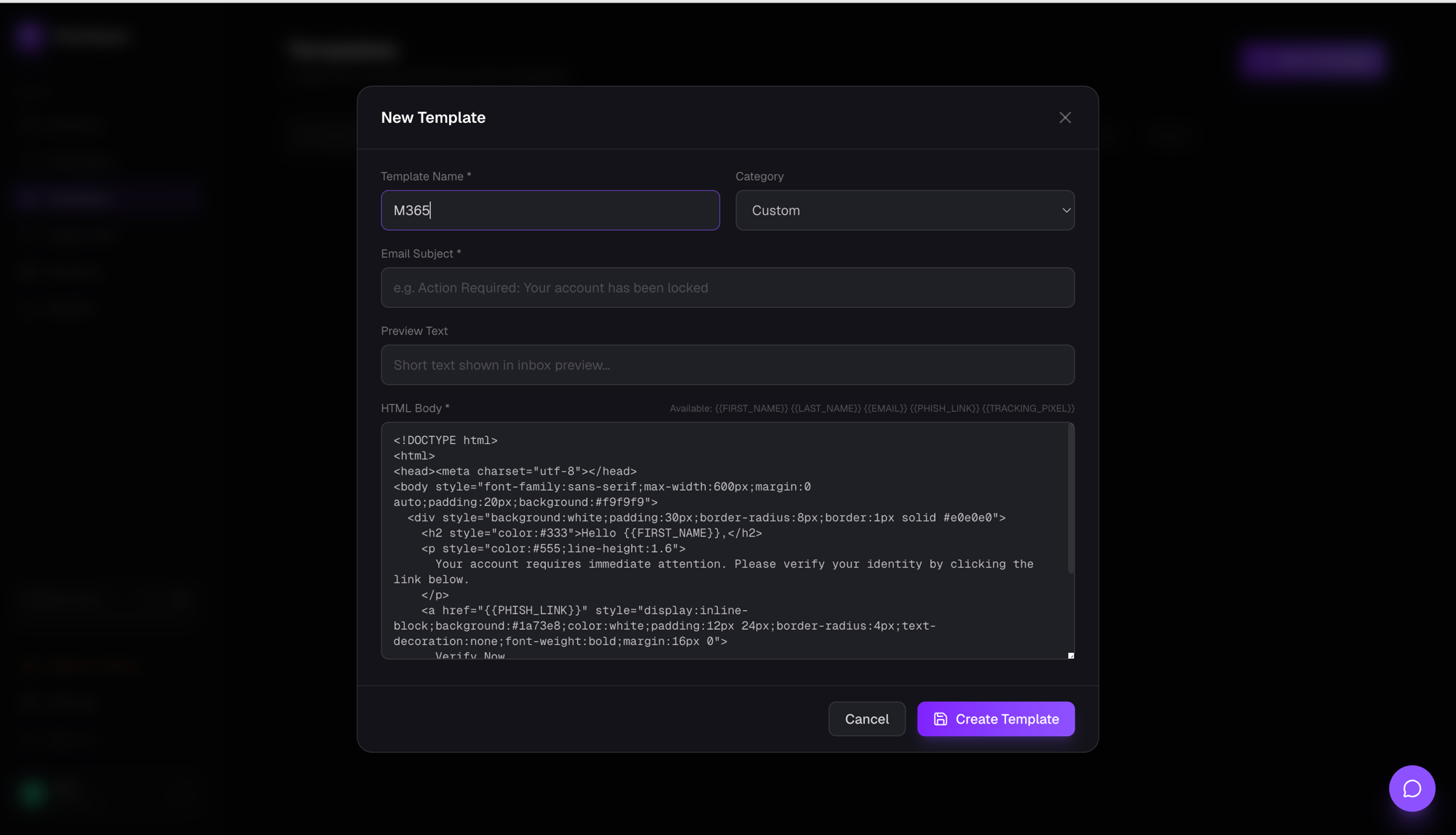
- Go to Templates → New Template
- Give it a descriptive name (e.g. "Microsoft 365 Password Expiry") — the name determines the brand PhishSpark shows on the landing page. Including "microsoft", "google", "slack", "okta", or "jumpcloud" in the name triggers automatic brand matching on the phishing landing page.
- Fill in the subject line (e.g. "Your Microsoft 365 password expires in 24 hours")
- Paste the HTML above into the HTML editor
- Save and use the template in a campaign
Tips for choosing the right template
- Match the template to what your employees actually use. A Microsoft 365 template at an all-Google-Workspace company is less effective — employees notice the brand mismatch.
- For a first campaign, use IT password reset or payroll. These have the highest click rates across all industries and produce the most useful baseline data.
- For advanced testing, use CEO/BEC or DocuSign. These are harder to spot and target specific high-risk roles (Finance, EAs).
- Rotate templates between campaigns. Employees who've seen the same template before will learn to recognise it — varying scenarios keeps results accurate.
Ready to launch a campaign?
Create a free PhishSpark account and send your first phishing simulation in under 30 minutes. The free tier covers 500 targets and one domain — enough for most initial assessments. No credit card required.
Run your first phishing simulation today
Free for up to 500 targets. No credit card, no DevOps, no setup headache.
Get started free